ClickHouse
简介
俄罗斯Yandex
列式数据库
C++编写
OLAP
SQL
20.6.3 开始有explain
20.8 实时同步mysql
安装
https://play.clickhouse.com/play?user=play
https://github.com/ClickHouse/ClickHouse/commits/master
https://packages.clickhouse.com/tgz/stable/
https://clickhouse.com/docs/en/architecture/replication
ClickHouse
官方文档:https://clickhouse.com/docs/zh
机器
ckh1 192.168.25.156
ckh2 192.168.25.157
ckh3 192.168.25.158
IP映射
echo '192.168.25.156 ckh1' >> /etc/hosts
echo '192.168.25.157 ckh2' >> /etc/hosts
echo '192.168.25.158 ckh3' >> /etc/hosts
SELINUX
关闭SELINUX
在/etc/selinux/config中关闭selinux,需要重启,或者setenforce 0可以临时启用,使用getenforce查看当前状态
若机器上有其他服务无法重启时,可修改文件且使用setenforce修改,这样即可满足当前需要又可在下次重启时生效
# This file controls the state of SELinux on the system.
# SELINUX= can take one of these three values:
#     enforcing - SELinux security policy is enforced.
#     permissive - SELinux prints warnings instead of enforcing.
#     disabled - No SELinux policy is loaded.
SELINUX=disabled
# SELINUXTYPE= can take one of three values:
#     targeted - Targeted processes are protected,
#     minimum - Modification of targeted policy. Only selected processes are protected.
#     mls - Multi Level Security protection.
SELINUXTYPE=targeted
下载tgz文件并安装
ckh_install.sh
手动下载tgz,然后按照shell脚本方式安装
https://clickhouse.com/docs/en/install#from-tgz-archives
curl -fO https://packages.clickhouse.com/tgz/stable/clickhouse-common-static-24.3.2.23-amd64.tgz
curl -fO https://packages.clickhouse.com/tgz/stable/clickhouse-common-static-dbg-24.3.2.23-amd64.tgz
curl -fO https://packages.clickhouse.com/tgz/stable/clickhouse-server-24.3.2.23-amd64.tgz
curl -fO https://packages.clickhouse.com/tgz/stable/clickhouse-client-24.3.2.23-amd64.tgz
<a href="https://packages.clickhouse.com/tgz/stable/clickhouse-common-static-24.3.2.23-amd64.tgz">clickhouse-common-static-24.3.2.23-amd64.tgz</a>

</p>
<a href="https://packages.clickhouse.com/tgz/stable/clickhouse-common-static-dbg-24.3.2.23-amd64.tgz">clickhouse-common-static-dbg-24.3.2.23-amd64.tgz</a>

</p>

<a href="https://packages.clickhouse.com/tgz/stable/clickhouse-server-24.3.2.23-amd64.tgz">clickhouse-server-24.3.2.23-amd64.tgz</a>

</p>

<a href="https://packages.clickhouse.com/tgz/stable/clickhouse-client-24.3.2.23-amd64.tgz">clickhouse-client-24.3.2.23-amd64.tgz</a>

<!-- 谷歌浏览器 右键 链接另存为 -->
# LATEST_VERSION=$(curl -s https://raw.githubusercontent.com/ClickHouse/ClickHouse/master/utils/list-versions/version_date.tsv | \
#     grep -Eo '[0-9]+\.[0-9]+\.[0-9]+\.[0-9]+' | sort -V -r | head -n 1)

LATEST_VERSION=24.3.2.23
export LATEST_VERSION

# case $(uname -m) in
#   x86_64) ARCH=amd64 ;;
#   aarch64) ARCH=arm64 ;;
#   *) echo "Unknown architecture $(uname -m)"; exit 1 ;;
# esac
ARCH=amd64

# for PKG in clickhouse-common-static clickhouse-common-static-dbg clickhouse-server clickhouse-client clickhouse-keeper
# do
#   curl -fO "https://packages.clickhouse.com/tgz/stable/$PKG-$LATEST_VERSION-${ARCH}.tgz" \
#     || curl -fO "https://packages.clickhouse.com/tgz/stable/$PKG-$LATEST_VERSION.tgz"
# done

tar -xzvf "clickhouse-common-static-$LATEST_VERSION-${ARCH}.tgz" \
  || tar -xzvf "clickhouse-common-static-$LATEST_VERSION.tgz"
sudo "clickhouse-common-static-$LATEST_VERSION/install/doinst.sh"

tar -xzvf "clickhouse-common-static-dbg-$LATEST_VERSION-${ARCH}.tgz" \
  || tar -xzvf "clickhouse-common-static-dbg-$LATEST_VERSION.tgz"
sudo "clickhouse-common-static-dbg-$LATEST_VERSION/install/doinst.sh"

tar -xzvf "clickhouse-server-$LATEST_VERSION-${ARCH}.tgz" \
  || tar -xzvf "clickhouse-server-$LATEST_VERSION.tgz"
sudo "clickhouse-server-$LATEST_VERSION/install/doinst.sh" configure
sudo /etc/init.d/clickhouse-server start

tar -xzvf "clickhouse-client-$LATEST_VERSION-${ARCH}.tgz" \
  || tar -xzvf "clickhouse-client-$LATEST_VERSION.tgz"
sudo "clickhouse-client-$LATEST_VERSION/install/doinst.sh"
...
ClickHouse binary is already located at /usr/bin/clickhouse
Symlink /usr/bin/clickhouse-server already exists but it points to /root/clickhouse. Will replace the old symlink to /usr/bin/clickhouse.
Creating symlink /usr/bin/clickhouse-server to /usr/bin/clickhouse.
Creating symlink /usr/bin/clickhouse-client to /usr/bin/clickhouse.
Creating symlink /usr/bin/clickhouse-local to /usr/bin/clickhouse.
Creating symlink /usr/bin/clickhouse-benchmark to /usr/bin/clickhouse.
Creating symlink /usr/bin/clickhouse-obfuscator to /usr/bin/clickhouse.
Creating symlink /usr/bin/clickhouse-git-import to /usr/bin/clickhouse.
Creating symlink /usr/bin/clickhouse-compressor to /usr/bin/clickhouse.
Creating symlink /usr/bin/clickhouse-format to /usr/bin/clickhouse.
Symlink /usr/bin/clickhouse-extract-from-config already exists but it points to /root/clickhouse. Will replace the old symlink to /usr/bin/clickhouse.
Creating symlink /usr/bin/clickhouse-extract-from-config to /usr/bin/clickhouse.
Symlink /usr/bin/clickhouse-keeper already exists but it points to /root/clickhouse. Will replace the old symlink to /usr/bin/clickhouse.
Creating symlink /usr/bin/clickhouse-keeper to /usr/bin/clickhouse.
Symlink /usr/bin/clickhouse-keeper-converter already exists but it points to /root/clickhouse. Will replace the old symlink to /usr/bin/clickhouse.
Creating symlink /usr/bin/clickhouse-keeper-converter to /usr/bin/clickhouse.
Creating symlink /usr/bin/clickhouse-disks to /usr/bin/clickhouse.
Creating symlink /usr/bin/ch to /usr/bin/clickhouse.
Creating symlink /usr/bin/chl to /usr/bin/clickhouse.
Creating symlink /usr/bin/chc to /usr/bin/clickhouse.
Creating clickhouse group if it does not exist.
 groupadd -r clickhouse
Creating clickhouse user if it does not exist.
 useradd -r --shell /bin/false --home-dir /nonexistent -g clickhouse clickhouse
Will set ulimits for clickhouse user in /etc/security/limits.d/clickhouse.conf.
Creating config directory /etc/clickhouse-server/config.d that is used for tweaks of main server configuration.
Creating config directory /etc/clickhouse-server/users.d that is used for tweaks of users configuration.
Config file /etc/clickhouse-server/config.xml already exists, will keep it and extract path info from it.
/etc/clickhouse-server/config.xml has /var/lib/clickhouse/ as data path.
/etc/clickhouse-server/config.xml has /var/log/clickhouse-server/ as log path.
Users config file /etc/clickhouse-server/users.xml already exists, will keep it and extract users info from it.
Creating log directory /var/log/clickhouse-server/.
Creating data directory /var/lib/clickhouse/.
Creating pid directory /var/run/clickhouse-server.
 chown -R clickhouse:clickhouse '/var/log/clickhouse-server/'
 chown -R clickhouse:clickhouse '/var/run/clickhouse-server'
 chown  clickhouse:clickhouse '/var/lib/clickhouse/'
 groupadd -r clickhouse-bridge
 useradd -r --shell /bin/false --home-dir /nonexistent -g clickhouse-bridge clickhouse-bridge
 chown -R clickhouse-bridge:clickhouse-bridge '/usr/bin/clickhouse-odbc-bridge'
 chown -R clickhouse-bridge:clickhouse-bridge '/usr/bin/clickhouse-library-bridge'
Enter password for the default user:
Password for the default user is saved in file /etc/clickhouse-server/users.d/default-password.xml.
Setting capabilities for clickhouse binary. This is optional.
Cannot set 'net_admin' or 'ipc_lock' or 'sys_nice' or 'net_bind_service' capability for clickhouse binary. This is optional. Taskstats accounting will be disabled. To enable taskstats accounting you may add the required capability later manually.
Allow server to accept connections from the network (default is localhost only), [y/N]: y
The choice is saved in file /etc/clickhouse-server/config.d/listen.xml.
 chown -R clickhouse:clickhouse '/etc/clickhouse-server'

ClickHouse has been successfully installed.

Start clickhouse-server with:
 sudo clickhouse start

Start clickhouse-client with:
 clickhouse-client --password

Created symlink from /etc/systemd/system/multi-user.target.wants/clickhouse-server.service to /usr/lib/systemd/system/clickhouse-server.service.
 chown -R clickhouse: '/var/run/clickhouse-server/'
Will run sudo --preserve-env -u 'clickhouse' /usr/bin/clickhouse-server --config-file /etc/clickhouse-server/config.xml --pid-file /var/run/clickhouse-server/clickhouse-server.pid --daemon
Waiting for server to start
Waiting for server to start
Server started
首先把停止服务
# 把服务停了
clickhouse stop
修改文件描述符和进程数
sudo vi /etc/security/limits.d/clickhouse.conf

clickhouse      soft    nofile  1048576
clickhouse      hard    nofile  1048576o
clickhouse      soft    nproc   65536
clickhouse      hard    nproc   65536
配置clickhouse-server
配置文件
/etc/clickhouse-client
/etc/clickhouse-keeper
/etc/clickhouse-server
数据文件
/var/lib/clickhouse
vi /etc/clickhouse-server/config.d/server-ckh1.xml
chown clickhouse:clickhouse /etc/clickhouse-server/config.d/server-ckh1.xml
server-ckh1.xml
<clickhouse>
    <!-- /etc/clickhouse-server/config.d/network-and-logging.xml -->
    <logger>
        <level>debug</level>
        <log>/var/log/clickhouse-server/clickhouse-server.log</log>
        <errorlog>/var/log/clickhouse-server/clickhouse-server.err.log</errorlog>
        <size>1000M</size>
        <count>3</count>
    </logger>
    <display_name>cluster-ckh1</display_name>
    <listen_host>0.0.0.0</listen_host>
    <http_port>8123</http_port>
    <tcp_port>9000</tcp_port>

    <!-- /etc/clickhouse-server/config.d/macros.xml -->
    <macros>
        <shard>01</shard>
        <replica>01</replica>
        <cluster>cluster_s_r</cluster>
    </macros>

    <!-- /etc/clickhouse-server/config.d/remote-servers.xml -->
    <remote_servers replace="true">
        <cluster_s_r>
            <shard>
                <internal_replication>true</internal_replication>
                <replica>
                    <host>ckh1</host>
                    <port>9000</port>
                </replica>
                <replica>
                    <host>ckh2</host>
                    <port>9000</port>
                </replica>
            </shard>
            <shard>
                <internal_replication>true</internal_replication>
                <replica>
                    <host>ckh3</host>
                    <port>9000</port>
                </replica>
            </shard>
        </cluster_s_r>
    </remote_servers>

    <!-- /etc/clickhouse-server/config.d/use-keeper.xml -->
    <zookeeper>
        <node>
            <host>ckh1</host>
            <port>9181</port>
        </node>
        <node>
            <host>ckh2</host>
            <port>9181</port>
        </node>
        <node>
            <host>ckh3</host>
            <port>9181</port>
        </node>
    </zookeeper>
</clickhouse>
server-ckh2.xml
<clickhouse>
    <!-- /etc/clickhouse-server/config.d/network-and-logging.xml -->
    <logger>
        <level>debug</level>
        <log>/var/log/clickhouse-server/clickhouse-server.log</log>
        <errorlog>/var/log/clickhouse-server/clickhouse-server.err.log</errorlog>
        <size>1000M</size>
        <count>3</count>
    </logger>
    <display_name>cluster-ckh2</display_name>
    <listen_host>0.0.0.0</listen_host>
    <http_port>8123</http_port>
    <tcp_port>9000</tcp_port>

    <!-- /etc/clickhouse-server/config.d/macros.xml -->
    <macros>
        <shard>01</shard>
        <replica>02</replica>
        <cluster>cluster_s_r</cluster>
    </macros>

    <!-- /etc/clickhouse-server/config.d/remote-servers.xml -->
    <remote_servers replace="true">
        <cluster_s_r>
            <shard>
                <internal_replication>true</internal_replication>
                <replica>
                    <host>ckh1</host>
                    <port>9000</port>
                </replica>
                <replica>
                    <host>ckh2</host>
                    <port>9000</port>
                </replica>
            </shard>
            <shard>
                <internal_replication>true</internal_replication>
                <replica>
                    <host>ckh3</host>
                    <port>9000</port>
                </replica>
            </shard>
        </cluster_s_r>
    </remote_servers>

    <!-- /etc/clickhouse-server/config.d/use-keeper.xml -->
    <zookeeper>
        <node>
            <host>ckh1</host>
            <port>9181</port>
        </node>
        <node>
            <host>ckh2</host>
            <port>9181</port>
        </node>
        <node>
            <host>ckh3</host>
            <port>9181</port>
        </node>
    </zookeeper>
</clickhouse>
server-ckh3.xml
<clickhouse>
    <!-- /etc/clickhouse-server/config.d/network-and-logging.xml -->
    <logger>
        <level>debug</level>
        <log>/var/log/clickhouse-server/clickhouse-server.log</log>
        <errorlog>/var/log/clickhouse-server/clickhouse-server.err.log</errorlog>
        <size>1000M</size>
        <count>3</count>
    </logger>
    <display_name>cluster-ckh3</display_name>
    <listen_host>0.0.0.0</listen_host>
    <http_port>8123</http_port>
    <tcp_port>9000</tcp_port>

    <!-- /etc/clickhouse-server/config.d/macros.xml -->
    <macros>
        <shard>02</shard>
        <replica>01</replica>
        <cluster>cluster_s_r</cluster>
    </macros>

    <!-- /etc/clickhouse-server/config.d/remote-servers.xml -->
    <remote_servers replace="true">
        <cluster_s_r>
            <shard>
                <internal_replication>true</internal_replication>
                <replica>
                    <host>ckh1</host>
                    <port>9000</port>
                </replica>
                <replica>
                    <host>ckh2</host>
                    <port>9000</port>
                </replica>
            </shard>
            <shard>
                <internal_replication>true</internal_replication>
                <replica>
                    <host>ckh3</host>
                    <port>9000</port>
                </replica>
            </shard>
        </cluster_s_r>
    </remote_servers>

    <!-- /etc/clickhouse-server/config.d/use-keeper.xml -->
    <zookeeper>
        <node>
            <host>ckh1</host>
            <port>9181</port>
        </node>
        <node>
            <host>ckh2</host>
            <port>9181</port>
        </node>
        <node>
            <host>ckh3</host>
            <port>9181</port>
        </node>
    </zookeeper>
</clickhouse>
配置clickhouse-keeper
vi /etc/clickhouse-keeper/keeper_config.xml

# chown clickhouse:clickhouse /etc/clickhouse-server/config.d/clickhouse-keeper.xml
此处只列出一份配置,三台机器配置仅id不一样
<clickhouse>
    <logger>
        <level>trace</level>
        <log>/var/log/clickhouse-keeper/clickhouse-keeper.log</log>
        <errorlog>/var/log/clickhouse-keeper/clickhouse-keeper.err.log</errorlog>
        <size>1000M</size>
        <count>3</count>
    </logger>
    <listen_host>0.0.0.0</listen_host>
    <keeper_server>
        <tcp_port>9181</tcp_port>
        <server_id>1</server_id>
        <log_storage_path>/var/lib/clickhouse/coordination/log</log_storage_path>
        <snapshot_storage_path>/var/lib/clickhouse/coordination/snapshots</snapshot_storage_path>
        <coordination_settings>
            <operation_timeout_ms>10000</operation_timeout_ms>
            <session_timeout_ms>30000</session_timeout_ms>
            <raft_logs_level>trace</raft_logs_level>
        </coordination_settings>
        <raft_configuration>
            <server>
                <id>1</id>
                <hostname>ckh1</hostname>
                <port>9444</port>
            </server>
            <server>
                <id>2</id>
                <hostname>ckh2</hostname>
                <port>9444</port>
            </server>
            <server>
                <id>3</id>
                <hostname>ckh3</hostname>
                <port>9444</port>
            </server>
        </raft_configuration>
    </keeper_server>
</clickhouse>
先启动clickhouse-keeper
如果server和keeper是安装在同一个节点,这步可以省略(就是放同一个配置文件)
sudo --preserve-env -u 'clickhouse' /usr/bin/clickhouse-keeper --config-file /etc/clickhouse-keeper/keeper_config.xml --daemon
启动时报错无法创建/var/lib/clickhouse-keeper
# 以root用户运行如下命令
mkdir /var/lib/clickhouse-keeper
chown -R clickhouse:clickhouse /var/lib/clickhouse-keeper
检查keeper是否正常,返回imok表示正常
# sudo yum install nc
echo ruok | nc localhost 9181; echo
# imok
再启动clickhouse-server
sudo --preserve-env -u 'clickhouse' /usr/bin/clickhouse-server --config-file /etc/clickhouse-server/config.xml --pid-file /var/run/clickhouse-server/clickhouse-server.pid --daemon
数据类型
整型
Int8 8bit [-128, 127]
Int16 16bit [-32768, 32767]
Int32 32bit
Int64
UInt8
UInt16
UInt32
UInt64
clickhouse中无布尔型,通常使用uint8取值0或者1代替布尔型
浮点型
Float32
Float64
Decimal32,有效位数为9
Decimal64,有效位数为18
Decimal128,有效位数为38
字符串
String,任意长度字符串
FixedString,定长字符串
枚举
保存’string’ = integer对应关系
Enum8
Enum16
枚举的价值在于空间优化(长数据映射为短数据)和数据约束(限制取值范围),实际应用中兼顾到业务变化风险,通常不在数据库层面使用枚举,而是在代码层面使用枚举,例如,代码层面建立枚举,使用枚举向数据库中写数据,数据库存为整型。
crtete table t_enum
(
    x Enum8('男'=1, '女'=2)
)
engine = TinyLog;


se;ect case(x, 'Int8') from t_enum;
时间类型
date,2024-04-21
datetime,2024-04-21 17:42:03
datetime64,2024-04-21 17:42:03.6352
数组
数据中元素可以为任意类型,mergetree不支持多维数据
select array(1, 2) as x, totypename(x);
nullable
不建议设置字段nullable,会对性能有影响,建议使用零值
存储引擎
表引擎、库引擎
TinyLog
数据以文件形式保存在磁盘中,没有索引,没有并发控制,可用于简单测试
create table t_tinylog(id string, name string) engine = tinylog;
Memory
数据以未压缩形式保存在内存中,不支持索引
MergeTree Family
MergeTree Family之于clickhouse,相当于innodb之于mysql
MergeTree
LSM-Tree
CREATE TABLE t_order_mt
(
    `id` UInt32,
    `sku_id` String,
    `total_amount` Decimal(16, 2),
    `create_time` Datetime,
    INDEX a total_amount TYPE minmax GRANULARITY 5
)
ENGINE = MergeTree
PARTITION BY toYYYYMMDD(create_time)
PRIMARY KEY id
ORDER BY (id, sku_id)
- order by:建表语句唯一必选参数,order by指定分区内数据排序方式
- primary key:主键,用于建立一级索引,不限制唯一性,主键必须是order by前缀字段,不设置主键时主键取order by值,即保证表中数据的顺序和索引中数据的顺序是一致的,索引粒度(一级索引中两个相邻索引的间隔)默认为8192,官方建议非必要不修改
- granularity:二级索引相对于一级索引的粒度
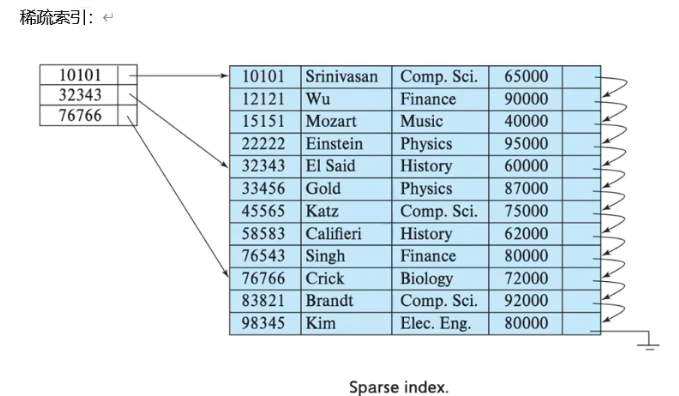
- 一级索引和二级索引都是稀疏索引,抽出一部分数据做索引,由于索引有序,故通过二分查找确定范围然后遍历即可找到
- TTL:列级别TTL、表级别TTL,用于管理列或者表数据的声明周期
clickhouse-client --send_logs_level=trace <<< 'select fromm t_order_mt where total_amount > toDecimal32(900, 2)';
分区
分区合并
[root@ckh1 default]# pwd
/var/lib/clickhouse/data/default
[root@ckh1 default]# ls
t_order_mt
[root@ckh1 default]# cd t_order_mt/
[root@ckh1 t_order_mt]# ll
total 16
drwxr-x---. 2 clickhouse clickhouse 4096 Apr 18 01:06 20200601_1_1_0
drwxr-x---. 2 clickhouse clickhouse 4096 Apr 18 01:06 20200602_2_2_0
drwxr-x---. 2 clickhouse clickhouse 4096 Apr 18 01:06 20200604_3_3_0
drwxr-x---. 2 clickhouse clickhouse    6 Apr 18 01:03 detached
-rw-r-----. 1 clickhouse clickhouse    1 Apr 18 01:03 format_version.txt
[root@ckh1 t_order_mt]# cd 20200601_1_1_0/
[root@ckh1 20200601_1_1_0]# ll
total 52
-rw-r-----. 1 clickhouse clickhouse 425 Apr 18 01:06 checksums.txt
-rw-r-----. 1 clickhouse clickhouse 118 Apr 18 01:06 columns.txt
-rw-r-----. 1 clickhouse clickhouse   1 Apr 18 01:06 count.txt
-rw-r-----. 1 clickhouse clickhouse 193 Apr 18 01:06 data.bin
-rw-r-----. 1 clickhouse clickhouse  66 Apr 18 01:06 data.cmrk3
-rw-r-----. 1 clickhouse clickhouse  10 Apr 18 01:06 default_compression_codec.txt
-rw-r-----. 1 clickhouse clickhouse   1 Apr 18 01:06 metadata_version.txt
-rw-r-----. 1 clickhouse clickhouse   8 Apr 18 01:06 minmax_create_time.idx
-rw-r-----. 1 clickhouse clickhouse   4 Apr 18 01:06 partition.dat
-rw-r-----. 1 clickhouse clickhouse  42 Apr 18 01:06 primary.cidx
-rw-r-----. 1 clickhouse clickhouse 292 Apr 18 01:06 serialization.json
-rw-r-----. 1 clickhouse clickhouse  50 Apr 18 01:06 skp_idx_a.cmrk3
-rw-r-----. 1 clickhouse clickhouse  40 Apr 18 01:06 skp_idx_a.idx2
[root@ckh1 20200602_2_2_0]# cd ..
[root@ckh1 t_order_mt]# cat format_version.txt
1
20200601_1_1_0
分区ID_最小分区号_最大分区号_合并层级

分区ID:由partition决定,若未定义分区键,则默认生成目录名为all的数据分区,所有数据存放在该目录下,若分区键为整型,则分区ID使用该整型值作为分区ID,若分区键为日期类型,若分区键为其他类型如字符串或者浮点型,使用哈希算法取其哈希做作为分区IS

最小分区号:从1开始递增,每产生一个分区就自增一个数字
最大分区号:新创建的最小分区号和最大分区号相等
合并层级,每合并一次,该值自增一个数字
checksums.txt						校验和
columns.txt							列类型
count.txt							分区数据量
data.bin							分区数据文件
data.cmrk3
default_compression_codec.txt
metadata_version.txt
minmax_create_time.idx				分区键的最大最小值
partition.dat
primary.cidx
serialization.json					数据统计信息
skp_idx_a.cmrk3
skp_idx_a.idx2
ReplacingMergeTree
在MergeTree的基础上增加了去重功能。
- 去重仅在分区合并时进行,分区合并时间不可控
- 去重仅发生在分区内,不能跨分区去重
- 仅适用于在后台清除重复数据以节约空间,无法保证没有重复数据
CREATE TABLE t_order_rmt
(
    `id` UInt32,
    `sku_id` String,
    `total_amount` Decimal(16, 2),
    `create_time` DateTime
)
ENGINE = ReplacingMergeTree(create_time)
PARTITION BY toYYYYMMDD(create_time)
PRIMARY KEY id
ORDER BY (id, sku_id);
以create_time为版本字段,重复数据保留版本号最大的数据,若不使用版本字段则默认按照插入顺序取最后一条
SummingMergeTree
不展示明细数据仅关心聚合结果的场景,使用SummingMergeTree预聚合相比于MergeTree可以节省数据空间消耗和聚合资源消耗。
CREATE TABLE t_order_smt
(
    `id` UInt32,
    `sku_id` String,
    `total_amount` Decimal(16, 2),
    `create_time` DateTime
)
ENGINE = SummingMergeTree(total_amount)
PRIMARY KEY id
ORDER BY (id, sku_id);
insert into t_order_smt values
(103,'sku_004',2500.00,'2020-06-01 12:00:00'),
(104,'sku_002',2000.00,'2020-06-01 12:00:00'),
(105,'sku_003',600.00,'2020-06-02 12:00:00'),
(106,'sku_001',1000.00,'2020-06-04 12:00:00'),
(107,'sku_002',2000.00,'2020-06-04 12:00:00'),
- order by字段为维度列
- 预聚合发生在分区之内,不会跨分区预聚合
- 指定total_amount为聚合数据列,聚合数据列必须为数字
- 若不指定聚合数据列,则会以所有非维度列作为聚合数据列
- 非数字列仅会按插入顺序保留第一个值
SQL
查看数据库、查看表、切换数据库
show databses;
use default;
show tables;
创建表
CREATE TABLE t_order_mt
(
    `id` UInt32,
    `sku_id` String,
    `total_amount` Decimal(16, 2),
    `create_time` Datetime
)
ENGINE = MergeTree
PARTITION BY toYYYYMMDD(create_time)
PRIMARY KEY id
ORDER BY (id, sku_id)
insert into t_order_mt values
(101,'sku_001',1000.00,'2020-06-01 12:00:00'),
(101,'sku_002',2000.00,'2020-06-01 12:00:00'),
(103,'sku_004',2500.00,'2020-06-01 12:00:00'),
(104,'sku_002',2000.00,'2020-06-01 12:00:00'),
(105,'sku_003',600.00,'2020-06-02 12:00:00'),
(106,'sku_001',1000.00,'2020-06-04 12:00:00'),
(107,'sku_002',2000.00,'2020-06-04 12:00:00'),
(108,'sku_004',2500.00,'2020-06-04 12:00:00'),
(109,'sku_002',2000.00,'2020-06-04 12:00:00'),
(110,'sku_003',600.00,'2020-06-01 12:00:00');
查询数据
select * from t_order_mt;
清空表数据
truncate table t_order_mt;
手动合并分区
optimize table t_order_mt final;
分组聚合
# 从右至左去掉维度进行小计,维度指group by所指字段
# GROUP BY a, b, c with GROUP BY == GROUP BY a, b, c GROUPING SETS((a, b, c), (a, b), (a), ())
SELECT
    id,
    sku_id,
    sum(total_amount)
FROM t_order_mt
GROUP BY
    id,
    sku_id
    WITH ROLLUP
    ┌──id─┬─sku_id──┬─sum(total_amount)─┐
 1. │ 110 │ sku_003 │               600 │
 2. │ 109 │ sku_002 │              2000 │
 3. │ 107 │ sku_002 │              2000 │
 4. │ 106 │ sku_001 │              1000 │
 5. │ 104 │ sku_002 │              2000 │
 6. │ 101 │ sku_002 │              2000 │
 7. │ 103 │ sku_004 │              2500 │
 8. │ 108 │ sku_004 │              2500 │
 9. │ 105 │ sku_003 │               600 │
10. │ 101 │ sku_001 │              1000 │
    └─────┴─────────┴───────────────────┘
    ┌──id─┬─sku_id─┬─sum(total_amount)─┐
11. │ 110 │        │               600 │
12. │ 106 │        │              1000 │
13. │ 105 │        │               600 │
14. │ 109 │        │              2000 │
15. │ 107 │        │              2000 │
16. │ 104 │        │              2000 │
17. │ 103 │        │              2500 │
18. │ 108 │        │              2500 │
19. │ 101 │        │              3000 │
    └─────┴────────┴───────────────────┘
    ┌─id─┬─sku_id─┬─sum(total_amount)─┐
20. │  0 │        │             16200 │
    └────┴────────┴───────────────────┘
# 从右至左去掉维度进行小计,再从左至右去掉维度进行小计
# GROUP BY a, b, c WITH CUBE == GROUP BY a, b, c GROUPING SETS((a, b, c), (a, b), (a, c), (b, c), (a),)
SELECT
    id,
    sku_id,
    sum(total_amount)
FROM t_order_mt
GROUP BY
    id,
    sku_id
    WITH CUBE
    ┌──id─┬─sku_id──┬─sum(total_amount)─┐
 1. │ 110 │ sku_003 │               600 │
 2. │ 109 │ sku_002 │              2000 │
 3. │ 107 │ sku_002 │              2000 │
 4. │ 106 │ sku_001 │              1000 │
 5. │ 104 │ sku_002 │              2000 │
 6. │ 101 │ sku_002 │              2000 │
 7. │ 103 │ sku_004 │              2500 │
 8. │ 108 │ sku_004 │              2500 │
 9. │ 105 │ sku_003 │               600 │
10. │ 101 │ sku_001 │              1000 │
    └─────┴─────────┴───────────────────┘
    ┌──id─┬─sku_id─┬─sum(total_amount)─┐
11. │ 110 │        │               600 │
12. │ 106 │        │              1000 │
13. │ 105 │        │               600 │
14. │ 109 │        │              2000 │
15. │ 107 │        │              2000 │
16. │ 104 │        │              2000 │
17. │ 103 │        │              2500 │
18. │ 108 │        │              2500 │
19. │ 101 │        │              3000 │
    └─────┴────────┴───────────────────┘
    ┌─id─┬─sku_id──┬─sum(total_amount)─┐
20. │  0 │ sku_003 │              1200 │
21. │  0 │ sku_004 │              5000 │
22. │  0 │ sku_001 │              2000 │
23. │  0 │ sku_002 │              8000 │
    └────┴─────────┴───────────────────┘
    ┌─id─┬─sku_id─┬─sum(total_amount)─┐
24. │  0 │        │             16200 │
    └────┴────────┴───────────────────┘
SELECT
    id,
    sku_id,
    sum(total_amount)
FROM t_order_mt
GROUP BY
    id,
    sku_id
    WITH TOTALS
    ┌──id─┬─sku_id──┬─sum(total_amount)─┐
 1. │ 110 │ sku_003 │               600 │
 2. │ 109 │ sku_002 │              2000 │
 3. │ 107 │ sku_002 │              2000 │
 4. │ 106 │ sku_001 │              1000 │
 5. │ 104 │ sku_002 │              2000 │
 6. │ 101 │ sku_002 │              2000 │
 7. │ 103 │ sku_004 │              2500 │
 8. │ 108 │ sku_004 │              2500 │
 9. │ 105 │ sku_003 │               600 │
10. │ 101 │ sku_001 │              1000 │
    └─────┴─────────┴───────────────────┘

Totals:
   ┌─id─┬─sku_id─┬─sum(total_amount)─┐
1. │  0 │        │             16200 │
   └────┴────────┴───────────────────┘
更新表结构
-- 删除某些数据并重新构造表
ALTER TABLE t_order_mt (DELETE WHERE sku_id = 'sku_001')
-- 更新某些数据并重新构造表
ALTER TABLE t_order_mt (UPDATE total_amount = toDecimal32(2000., 2) WHERE id = 105)
-- 新增字段并重新构造表
ALTER TABLE t_order_mt (ADD COLUMN `p_name` String AFTER sku_id)
-- 修改字段数据类型并重新构造表
ALTER TABLE t_order_mt (MODIFY COLUMN `p_name` FixedString(10))
-- 删除字段并重新构造表
ALTER TABLE t_order_mt (DROP COLUMN p_name)
SQL优化
explain
简单查询
explain plan select arrayJoin([1,2,3,null,null]);
   ┌─explain─────────────────────────────────────────────────────────────────────────────────┐
1. │ Expression ((Project names + (Projection + Change column names to column identifiers))) │
2. │   ReadFromStorage (SystemOne)                                                           │
   └─────────────────────────────────────────────────────────────────────────────────────────┘
复杂sql执行计划
explain select database,table,count(1) cnt from system.parts where database in ('datasets','system') group by database,table order by database,cnt desc limit 2 by database;
   ┌─explain────────────────────────────────────────────────────────────────────┐
1. │ Expression (Project names)                                                 │
2. │   LimitBy                                                                  │
3. │     Expression (Before LIMIT BY)                                           │
4. │       Sorting (Sorting for ORDER BY)                                       │
5. │         Expression ((Before ORDER BY + Projection))                        │
6. │           Aggregating                                                      │
7. │             Expression (Before GROUP BY)                                   │
8. │               Filter ((WHERE + Change column names to column identifiers)) │
9. │                 ReadFromSystemPartsBase                                    │
   └────────────────────────────────────────────────────────────────────────────┘
打开全部参数的执行计划
EXPLAIN header=1, actions=1,description=1 SELECT number from system.numbers limit 10;
    ┌─explain─────────────────────────────────────────────────────────────────────────────────┐
 1. │ Expression ((Project names + (Projection + Change column names to column identifiers))) │
 2. │ Header: number UInt64                                                                   │
 3. │ Actions: INPUT : 0 -> number UInt64 : 0                                                 │
 4. │          ALIAS number :: 0 -> __table1.number UInt64 : 1                                │
 5. │          ALIAS __table1.number :: 1 -> number UInt64 : 0                                │
 6. │ Positions: 0                                                                            │
 7. │   Limit (preliminary LIMIT (without OFFSET))                                            │
 8. │   Header: number UInt64                                                                 │
 9. │   Limit 10                                                                              │
10. │   Offset 0                                                                              │
11. │     ReadFromSystemNumbers                                                               │
12. │     Header: number UInt64                                                               │
    └─────────────────────────────────────────────────────────────────────────────────────────┘
EXPLAIN AST SELECT number from system.numbers limit 10;
    ┌─explain─────────────────────────────────────┐
 1. │ SelectWithUnionQuery (children 1)           │
 2. │  ExpressionList (children 1)                │
 3. │   SelectQuery (children 3)                  │
 4. │    ExpressionList (children 1)              │
 5. │     Identifier number                       │
 6. │    TablesInSelectQuery (children 1)         │
 7. │     TablesInSelectQueryElement (children 1) │
 8. │      TableExpression (children 1)           │
 9. │       TableIdentifier system.numbers        │
10. │    Literal UInt64_10                        │
    └─────────────────────────────────────────────┘
查看PIPELINE
EXPLAIN PIPELINE header = 1, graph = 1
SELECT sum(number)
FROM numbers_mt(10000)
GROUP BY number % 20
建表优化
nullable
不使用Nullable类型,Nullable无法被索引,使用业务无意义值表示“空值”。
https://clickhouse.com/docs/en/sql-reference/data-types/nullable
分区与索引
分区粒度根据业务特点决定,不宜过粗或过细。一般选择按天分区,也可以指定为 Tuple(), 以单表一亿数据为例,分区大小控制在 10-30 个为最佳。 必须指定索引列,ClickHouse 中的索引列即排序列,通过 order by 指定,一般在查询条 件中经常被用来充当筛选条件的属性被纳入进来;可以是单一维度,也可以是组合维度的索 引;通常需要满足高级列在前、查询频率大的在前原则;还有基数特别大的不适合做索引列, 如用户表的 userid 字段;通常筛选后的数据满足在百万以内为最佳。
Index_granularity 是用来控制索引粒度的,默认是 8192,如非必须不建议调整。
PARTITION BY toYYYYMM(EventDate) ORDER BY (CounterID, EventDate, intHash32(UserID))
PARTITION BY toYYYYMM(StartDate) ORDER BY (CounterID, StartDate, intHash32(UserID), VisitID)
TTL
如果表中不是必须保留全量历史数据,建议指定 TTL(生存时间值),可以免去手动过期 历史数据的麻烦,TTL 也可以通过 alter table 语句随时修改
写入和删除优化
(1)尽量不要执行单条或小批量删除和插入操作,这样会产生小分区文件,给后台 Merge 任务带来巨大压力 (2)不要一次写入太多分区,或数据写入太快,数据写入太快会导致 Merge 速度跟不 上而报错,一般建议每秒钟发起 2-3 次写入操作,每次操作写入 2w~5w 条数据(依服务器 性能而定
处理方式:
“ Too many parts 处理 ” :使用 WAL 预写日志,提高写入性能。
in_memory_parts_enable_wal 默认为 true
在服务器内存充裕的情况下增加内存配额,一般通过 max_memory_usage 来实现
在服务器内存不充裕的情况下,建议将超出部分内容分配到系统硬盘上,但会降低执行
速度,一般通过 max_bytes_before_external_group_by、max_bytes_before_external_sort 参数
来实现。
基于更新表结构的更新和删除数据优化
由于clickhouse执行alter table会生成新的分区,如果少量且频繁更新会导致分区频繁创建,可以增加删除标记is_del以及更新版本号version两个字段将删除和更新数据转化为插入数据
语法优化
//先做一次查询
SELECT number = 1 ? 'hello' : (number = 2 ? 'world' : 'atguigu') FROM
numbers(10);
//查看语法优化
EXPLAIN SYNTAX SELECT number = 1 ? 'hello' : (number = 2 ? 'world' :
'atguigu') FROM numbers(10);
//开启三元运算符优化
SET optimize_if_chain_to_multiif = 1;
//再次查看语法优化
EXPLAIN SYNTAX SELECT number = 1 ? 'hello' : (number = 2 ? 'world' :
'atguigu') FROM numbers(10);
//返回优化后的语句
SELECT multiIf(number = 1, \'hello\', number = 2, \'world\', \'xyz\')
FROM numbers(10)