客户端
Elasticsearch8.0版本中Elasticsearch Java API Client客户端的基本使用方法
https://blog.csdn.net/anjiongyi/article/details/123391835
elasticsearch中keyword存储float,查询时返回float问题
https://github.com/elastic/elasticsearch/issues/34222
https://www.elastic.co/guide/en/elasticsearch/client/index.html
ElasticSearch Client
上述部分为理论部分,实际开发中,主要有三种方式可以作为es服务的客户端:
- 使用elasticsearch-head插件
- 使用elasticsearch提供的Restful接口直接访问
- 使用elasticsearch提供的API进行访问
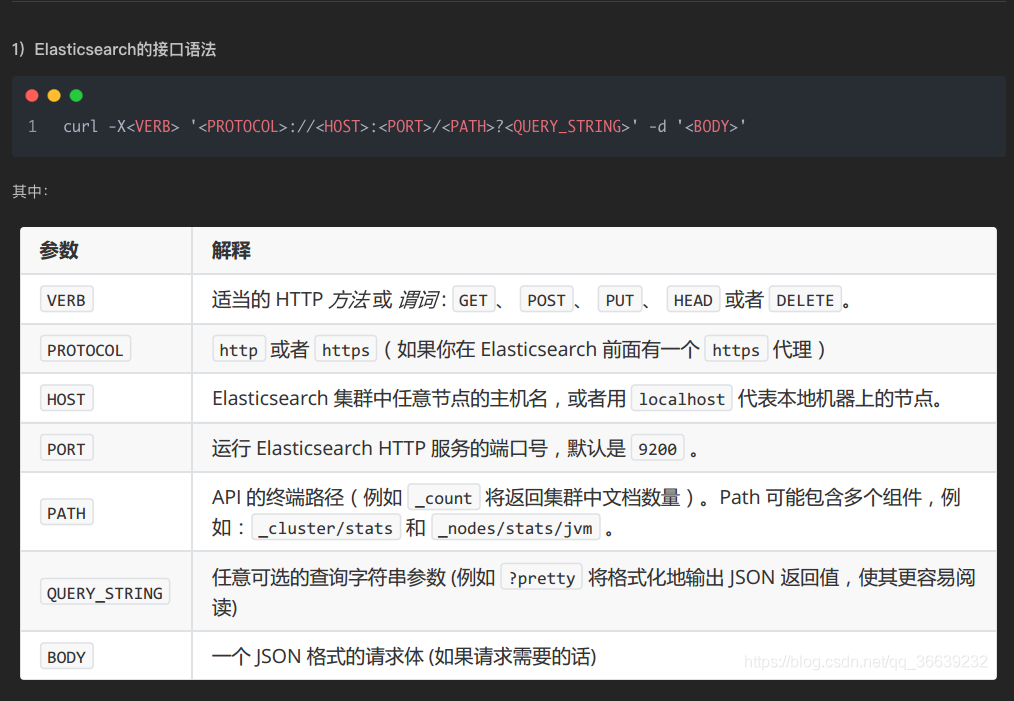
集群与节点操作
# 查看集群健康状态
GET /_cat/health?v
curl -X GET "localhost:9200/_cat/health?v&pretty"
- Green - everything is good (cluster is fully functional)
- Yellow - all data is available but some replicas are not yet allocated (cluster is fully functional)
- Red - some data is not available for whatever reason (cluster is partially functional)

# 查看节点
GET /_cat/nodes?v
curl -X GET "localhost:9200/_cat/nodes?v&pretty"

# 查看索引
GET /_cat/indices?v
curl -X GET "localhost:9200/_cat/indices?v&pretty"

# 查看分片
GET _cat/shards?v
curl -X GET "localhost:9200/_cat/shards?v&pretty"
elasticsearch-py线程池封装于Transport类
elasticsearch-py,官方客户端
https://github.com/elastic/elasticsearch-py
https://www.elastic.co/guide/en/elasticsearch/client/python-api/current/getting-started-python.html
elasticsearch-dsl-py,官方高级客户端
https://pypi.org/project/elasticsearch-dsl/
https://github.com/elastic/elasticsearch-dsl-py
Pydastic
Pydastic is an elasticsearch python ORM based on Pydantic.
https://github.com/RamiAwar/pydastic
https://pypi.org/project/pydastic/
elasticsearch-dsl
https://elasticsearch-dsl.readthedocs.io/en/latest/index.html
config
 from elasticsearch_dsl import connections

 connections.create_connection(alias="default", hosts=['localhost:9200'], timeout=30)
 from elasticsearch_dsl import connections

 connections.configure(
     default={'hosts': 'localhost'},
     dev={
         'hosts': ['esdev1.example.com:9200'],
         'sniff_on_start': True
     }
 )
 import decimal

 from elasticsearch import helpers
 from elasticsearch_dsl import Document, Date, Long, Keyword, \
     Q, ValidationException, MetaField
 from elasticsearch_dsl import connections

 connections.create_connection(alias="default", hosts=['localhost:9200'], timeout=30)


 class KeyWord(Keyword):
     _coerce = True

     def _deserialize(self, data):
         return decimal.Decimal(data)

     def clean(self, data):
         if data is not None:
             data = str(data)
         if data is None and self._required:
             raise ValidationException("Value required for this field.")
         return data


 class AaaIndex(Document):
     """
     净值视图
     """

     class Meta:
         dynamic = MetaField('strict')

     class Index:
         name = 'net_value_view'
         using = 'default'

     id = Long(required=False)
     product_code = Keyword(required=True)
     trading_day = Date(required=True)
     unit_nv = Keyword(required=False)
     accu_nv = Keyword(required=False)
     adju_nv = Keyword(required=False)
     unit_nv_drr = Keyword(required=False)
     adju_nv_drr = Keyword(required=False)
     seven_day_annualized_rr = Keyword(required=False)
     daily_return_per_10000_shares = Keyword(required=False)
     created_time = Date()
     updated_time = Date()


 AaaIndex.init()

 d = {"_id": "123456",
      "product_code": "P0001",
      "trading_day": "2020-01-01",
      "unit_nv": decimal.Decimal("1.2"),
      "accu_nv": "1.32",
      "adju_nv": 0.1,
      "unit_nv_drr": decimal.Decimal("1.3"),
      }


 # print(NetValueView(**d).save())


 def bulk_insert_ds_data_change_log(logs: list[dict]):
     if not logs:
         return
     actions = [{"_index": AaaIndex.Index.name, "_source": log, "_id": log.pop("_id")} for log in logs]
     res = helpers.bulk(client=connections.get_connection(AaaIndex.Index.using), actions=actions, refresh='wait_for')
     return res


 bulk_insert_ds_data_change_log([d])
 # NetValueView().to_dict()

 f = AaaIndex.get(id="5gVy64sB4K8-J81-B_T5")
 print(type(f.unit_nv), type(f.accu_nv), type(f.adju_nv))
 print(format(f.adju_nv, '.64f'))

 es = AaaIndex.search()
 es = es.query(Q('ids', **{'values': ["123456"]}))
 a = es.execute()
 print([item.to_dict() for item in a])
elasticsearch-py
helpers.bulk
在 Elasticsearch 中,_op_type 是用于标识执行的操作类型的关键字。主要的 _op_type 可选值包括:
index: 创建新的文档或替换现有文档。create: 创建新的文档,如果文档已存在则返回错误。update: 更新现有文档。delete: 删除现有文档。
这些值代表了针对文档的不同操作类型。在使用 helpers.bulk 方法时,可以通过设置 _op_type 来指定要执行的操作类型。根据具体的操作需求,选择相应的 _op_type 值来进行相应的操作。
import elasticsearch
# import tqdm
from elasticsearch import helpers

# es
es_client = elasticsearch.Elasticsearch(hosts=[{"host": "127.0.0.1", "port": 9200}])
# es = Elasticsearch(['10.10.13.12'], http_auth=('xiao', '123456'), timeout=3600)
# 如果需要验证,需要用户名密码,timeout默认为10秒


# 创建索引
result = es_client.indices.create(index="user", ignore=400, body={
    "mappings": {
        "my_doc": {
            "properties": {
                "my_id": {"type": "integer"},
                "my_word": {"type": "text"}
            }
        }
    }
})
print(result)

# 判断索引是否存在
result = es_client.indices.exists("user")
print(result)


def keywordSearch(keyword, index):
    body = {
        "query": {
            "match": {
                "my_word": keyword
            }
        }
    }

    # 直接查询
    res = es_client.search(index=index, body=body)
    total = res["hits"]["total"]
    print("共查询到%d条数据" % total)

    # helpers查询
    res = helpers.scan(client=es_client, query=body, index=index)
    res_dict = []
    for item in res:
        temp = item["_source"]
        res_dict.append((temp["my_id"], temp["my_word"]))
    print("共%d条数据" % len(res_dict))
    print(res_dict)


keywordSearch("三","user")
# 插入数据
import elasticsearch

es_client = elasticsearch.Elasticsearch()

# body是一个字典
body = {
    "id": "",
    "name": "",
    "age": "",
    "gender": "",
    "id_card": "",
    "address": "",
    "contact": {
        "phone": "",
        "email": "",
        "QQ": "",
        "Wechat": ""
    }

}

# create需要制定id
result = es_client.create(index='user', doc_type='dc', id=1, body=body,ignore=409)
print(result)

# index不需要,由系统自动生成
result = es_client.index(index='user', doc_type='dc', body=body)

print(result)

# 更新数据
# index() 方法可以代替我们完成两个操作,如果数据不存在,那就执行插入操作,如果已经存在,那就执行更新操作,非常方便。
# 两种方法

body = {
    "id": "",
    "name": "",
    "age": "",
    "gender": "",
    "birthday": "",
    "id_card": "",
    "address": "",
    "contact": {
        "phone": "",
        "email": "",
        "QQ": "",
        "Wechat": ""
    }

}
result = es_client.update(index='user', doc_type='dc', id=1, body=body)

print(result)

result = es_client.index(index='user', doc_type='dc', body=body,id=1)
print(result)
import elasticsearch
import json

# 更新mapping
es_client = elasticsearch.Elasticsearch()
mapping = {
    "properties":{
        ""
    }
}

result = es_client.indices.put_mapping(index='news', doc_type='politics', body=mapping)

print(result)


# 查询文档
result = es_client.search(index='news', doc_type='politics')

print(result)

dsl = {

    'query': {

        'match': {

            'title': '中国 领事馆'

        }

    }

}


result = es_client.search(index='news', doc_type='politics', body=dsl)

print(json.dumps(result, indent=2, ensure_ascii=False))
import elasticsearch

# es客户端
es_client = elasticsearch.Elasticsearch()

# 索引操作

# 创建索引
result = es_client.indices.create(index='user', ignore=400)
print(result)
# 400状态码是索引已经存在,ignore=400会忽略该类型报错

# 删除索引
result = es_client.indices.delete(index='user', ignore=[400, 404])
print(result)


# 文档操作
# elasticsearch dsl

import elasticsearch
from datetime import datetime
from elasticsearch import Elasticsearch
print(elasticsearch.__version__)

# 创建ES客户端对象
es_client = Elasticsearch(hosts=[{"scheme": "http", "host": "127.0.0.1", "port": 9200}])

doc = {
    'author': 'kimchy',
    'text': 'Elasticsearch: cool. bonsai cool.',
    'timestamp': datetime.now(),
}

resp = es_client.index(index="test-index", id="1", document=doc)
print(resp['result'])

resp = es_client.get(index="test-index", id="1")
print(resp['_source'])

es_client.indices.refresh(index="test-index")

resp = es_client.search(index="test-index", query={"match_all": {}})
print("Got %d Hits:" % resp['hits']['total']['value'])
for hit in resp['hits']['hits']:
    print("%(timestamp)s %(author)s: %(text)s" % hit["_source"])