https://www.elastic.co/cn/observability/application-performance-monitoring
https://www.elastic.co/cn/observability/infrastructure-monitoring
https://www.elastic.co/cn/observability/log-monitoring
经典方案是 ELK 和 EFK,Logstash 功能强大但是资源占用高,Filebeat 资源占用低但是功能不如 Logstash,大量日志用 ELK 资源占用有潜在优化空间,复杂日志用 EFK 无法实现完美解析,结合一下 ELFK 是一个综合方案。
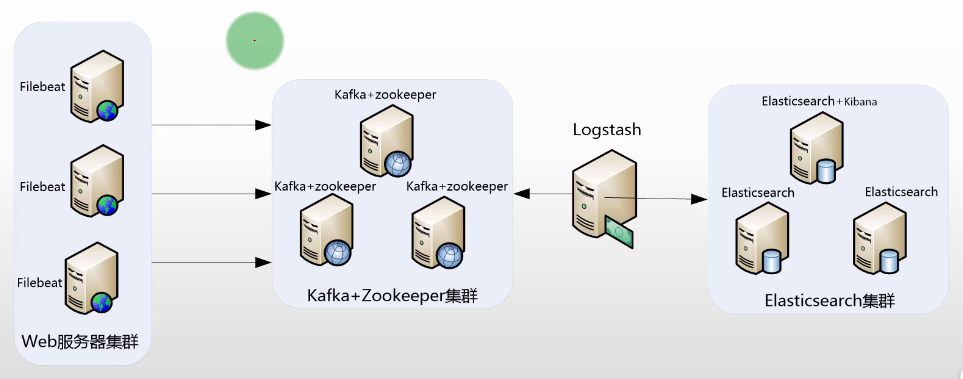
- Filebeat:服务测日志采集
- Kafka:日志流缓冲
- Logstash:日志收集、过滤、解析、转发
- Elasticsearch:日志存储
- Kibana:日志展示、分析
搭建 xxx_service
见 Filebeat 部分 xxx_service.py。
搭建 Elasticsearch
安装配置见 Elasticsearch 部分。
搭建 Kibana
安装配置见 Kibana 部分。
搭建 Kafka
安装配置见 DatabaseSystem/Kafka 部分。
./bin/kafka-topics.sh --create --topic topic-xxx_service-log --bootstrap-server localhost:9092
搭建 Filebeat
安装配置见 Filebeat 部分。
filebeat.yml
filebeat:
  inputs:
    - type: log
      enabled: true
      paths:
        - /home/ubuntu/biz.log  # 替换为你的日志文件路径
      fields:
        service: xxx_service # 自定义字段
        env: prod # 自定义字段
        log_topic: topic-xxx_service-log
      multiline.pattern: '^\[[0-9]{4}-[0-9]{2}-[0-9]{2} [0-9]{2}:[0-9]{2}:[0-9]{2},[0-9]{3}\]'  # 匹配以日期开头的行
      multiline.negate: true  # 匹配不包含模式的行
      multiline.match: after  # 将匹配模式后的所有行合并到一条事件中
output:
  kafka:
    # initial brokers for reading cluster metadata
    hosts: [ "localhost:9092" ]

    # message topic selection + partitioning
    topic: '%{[fields.log_topic]}'
    partition.round_robin:
      reachable_only: false

    required_acks: 1
    compression: gzip
    max_message_bytes: 1000000
./filebeat -e -c filebeat.yml
./bin/kafka-console-consumer.sh --topic topic-xxx_service-log --from-beginning --bootstrap-server localhost:9092 --max-messages 1
{
  "@timestamp": "2025-10-06T06:21:35.573Z",
  "@metadata": {
    "beat": "filebeat",
    "type": "_doc",
    "version": "8.19.3"
  },
  "host": {
    "name": "ECS-HN-3121563685"
  },
  "agent": {
    "ephemeral_id": "46127670-32ce-4e8d-a944-8ba1fb02a08c",
    "id": "0e0dc387-f2f5-4d0a-99ba-7979b131f062",
    "name": "ECS-HN-3121563685",
    "type": "filebeat",
    "version": "8.19.3"
  },
  "message": "[2025-10-06 06:21:34,975] [web_logger] [ERROR] [54975ad5-5a4e-4e59-9ddb-2e8d4f8ae898] [log_function_3] [71] [1995498] [124911181021312]: division by zero\nTraceback (most recent call last):\n  File \"/home/ubuntu/xxx_service.py\", line 69, in log_function_3\n    1 / 0\n    ~~^~~\nZeroDivisionError: division by zero",
  "log": {
    "offset": 351282,
    "file": {
      "path": "/home/ubuntu/biz.log"
    },
    "flags": [
      "multiline"
    ]
  },
  "input": {
    "type": "log"
  },
  "fields": {
    "env": "prod",
    "log_topic": "topic-xxx_service-log",
    "service": "xxx_service"
  },
  "ecs": {
    "version": "8.0.0"
  }
}
搭建 Logstash
安装配置见 Logstash 部分。
/usr/local/logstash/config/conf.d/default.conf
input {
  kafka {
    bootstrap_servers => "localhost:9092"
    topics => ["topic-xxx_service-log"]
    codec => json
    auto_offset_reset => "earliest"
    consumer_threads => 2
    decorate_events => true
  }
}

filter {
  # 解析日志中的消息字段
  grok {
    match => { "message" => "\[%{TIMESTAMP_ISO8601:log_timestamp}\] \[%{WORD:logger}\] \[%{LOGLEVEL:loglevel}\] \[%{USERNAME:trace_id}\] \[%{USERNAME:function_name}\] \[%{NUMBER:line_number}\] \[%{NUMBER:process_id}\] \[%{NUMBER:thread_id}\]: %{GREEDYDATA:log_message}" }
  }

  # 解析日期时间
  date {
    match => [ "log_timestamp", "yyyy-MM-dd HH:mm:ss,SSS" ]
    target => "@timestamp"
    remove_field => ["log_timestamp"]
  }

  # 添加额外的字段
  mutate {
    add_field => {
      "service" => "%{[fields][service]}"
      "env" => "%{[fields][env]}"
      "log_topic" => "%{[fields][log_topic]}"
    }
    remove_field => ["fields"]
  }
}

output {
  elasticsearch {
    index => "logstash-%{service}-%{+YYYY-MM}"
    # ES 地址
    hosts => ["https://localhost:9200"]
    # 若开启认证需要配置用户名和密码
    user => "elastic"
    password => "eS123456_"

    ### 注意:证书仅支持 PEM 格式,若为其他格式需要转换
    # 若开启客户段 SSL 需配置证书
    ssl_enabled => true
    # CA 证书路径
    ssl_certificate_authorities => ["/usr/local/elasticsearch-cluster/elasticsearch/config/certs/elastic-stack-ca.pem"]
    # 客户端证书路径
    ssl_certificate => "/usr/local/elasticsearch-cluster/elasticsearch/config/certs/http/elasticsearch/http.pem"
    # 客户端密钥路径
    ssl_key => "/usr/local/elasticsearch-cluster/elasticsearch/config/certs/http/elasticsearch/key.pem"
    # 验证服务器证书
    ssl_verification_mode => "full"
  }
}
./bin/logstash
查看日志
在 Kibana 中Analytics/Discover创建一个Data View,名称为logstash-xxx_service,索引模式为logstash-xxx_service-*,timestamp 字段为@timestamp。